

Infibee Technologies offers India’s No.1 SAP Workflow Training in Chennai with globally recognized certification and 100% placement guidance.
Build a successful career with our industry-focused SAP Workflow Course in Chennai, guided by 12+ years of real-world industry experience. Our comprehensive training includes hands-on mock projects, real-time workflow automation projects, resume preparation, interview preparation, placement training, affordable SAP Workflow course fees, and lifetime access to recorded live classes.
Join our SAP Workflow Training Institute in Chennai and ignite your career with high-paying jobs in top MNC companies.
SAP CI Training in Chennai
SAP EDI Training in Chennai
SAP GTS Training in Chennai
SAP PSCD Training in Chennai
Live Online :























Infibee’s SAP Workflow Course in Chennai helps students and IT professionals get really comfortable with SAP Business Workflow, basically an automation tool that helps streamline, observe and improve business operations running inside SAP ERP setups. you’ll go through workflow architecture, business objects, events, tasks, workflow templates, agents, containers, deadlines, notifications, approvals, debugging and you also learn how to connect everything with other SAP modules via practical, hands on projects.
SAP Workflow is important for automating business routines like purchase approvals, leave requests, invoice processing, procurement, document handling, plus HR operations. With it, operational efficiency tends to rise, there is less need for manual intervention, process visibility becomes clearer and compliance tends to hold up better across enterprise environments.
Through this course learners can grasp how workflow is designed, how business objects are created, how events are triggered, how tasks are managed day to day and how workflow administration works in real scenarios. You also cover exception handling, and troubleshooting when something goes off track. Students get live implementation practice by building enterprise workflow solutions that can be used in SAP ECC and SAP S/4HANA environments.
SAP Workflow professionals are in demand across Manufacturing, Banking, Retail, Healthcare, Telecommunications, Automotive, Logistics, Energy, Pharmaceuticals, Government, IT Services, and Consulting groups. Since many enterprises keep pushing to automate business tasks and digital workflows, the need for SAP Workflow Consultants keeps rising in many countries. Finishing this course can lead to strong career paths as an SAP Workflow Consultant, an SAP Technical Consultant, an SAP ABAP Workflow Developer, and even an SAP Solution Architect.
| SAP Workflow Course Topics Covered | Applications of SAP Workflow Course | Tools Used |
|---|---|---|
| Introduction to SAP Workflow | Business Process Automation | SAP Workflow Builder |
| Workflow Architecture | Purchase Approval Automation | SAP GUI |
| Business Objects | HR Workflow Management | SAP Business Object Repository (BOR) |
| Events & Event Linkage | Invoice Processing | SAP ECC |
| Workflow Templates | Procurement Workflow | SAP S/4HANA |
| Tasks & Agents | Leave Approval Process | SAP Business Workplace |
| Containers & Bindings | Document Approval | SAP ABAP Workbench |
| Deadline Monitoring | Notification Management | SAP Solution Manager |
| Workflow Administration | Enterprise Process Automation | SAP Fiori |
| Debugging & Real-Time Projects | Digital Business Transformation | SAP NetWeaver |
Located in the heart of Chennai, Infibee Technologies is the premier SAP Workflow Training Institute in Chennai, where we offer industry-focused training for graduates, SAP consultants, ABAP developers, software professionals, ERP consultants, and working professionals. Our learning plan goes through SAP Workflow architecture, business objects, events, workflow templates, tasks, containers, approvals, notifications, debugging, administration and even SAP S/4HANA workflow implementation using practical business scenarios.
The trainers here have 10+ years of real time SAP implementation experience. They bring practical knowledge from enterprise SAP projects across multiple industries. During training students get instructor-led sessions with live demonstrations and hands on laboratory practice. There are practical assignments, plus real world case studies which feels closer to how things work outside.
At Infibee Technologies there’s a strong focus on real time project exposure. So students can design, configure, implement and troubleshoot enterprise workflow processes. Learners end up with workflow automation experience for procurement, HR, finance, document approvals, plus broader business process management.
The teaching methodology conceptual understanding with live SAP server practice. There are project based assignments, recorded sessions, one to one mentoring, doubt clarification and continuous assessments so the concepts of SAP Workflow stay clear. We also provide flexible learning options including classroom training, live online classes, corporate training, weekend batches, weekday sessions, and fast-track programs. Our course fees are affordable, that way quality SAP Workflow training stays reachable for students and professionals.
Students also get full placement help resume preparation, mock interviews, technical mentoring, career counseling and SAP certification guidance . Infibee Technologies has already placed more than 500+ students in major MNCs and top software companies, through out the years. If you are beginning your SAP career or trying to upgrade your technical skills, Infibee Technologies offers hands on learning, real industry exposure and professional guidance that you need to grow into a successful SAP Workflow Consultant.
Students receive an Infibee Technologies Course Completion Certificate with expert guidance for SAP global certification preparation, validating SAP Workflow implementation skills, business process automation expertise, technical proficiency, and career readiness.
| S.No | Certification Code | Approximate Cost (INR) | Certification Expiry |
|---|---|---|---|
| 1 | C_TAW12_750 – SAP Certified Development Associate – ABAP with SAP NetWeaver | ₹17,000–₹21,000 | Valid until certification version retirement |
| 2 | C_TS410_2022 – SAP Certified Associate – Business Process Integration with SAP S/4HANA | ₹17,000–₹21,000 | Valid until certification version retirement |
| 3 | CER001 – SAP Global Certification Attempt | ₹17,000–₹21,000 | Stay Current Program Recommended |
| Experience | Job Role | Average Salary (LPA) |
|---|---|---|
| Freshers (0–3 Years) | SAP Workflow Trainee | ₹4–6 LPA |
| Junior SAP Workflow Developer | ₹4.5–6.5 LPA | |
| SAP Technical Associate | ₹5–7 LPA | |
| Mid-Level (4–8 Years) | SAP Workflow Consultant | ₹8–12 LPA |
| SAP ABAP Workflow Developer | ₹9–14 LPA | |
| SAP Technical Consultant | ₹10–15 LPA | |
| SAP Workflow Lead | ₹12–18 LPA | |
| Senior (9+ Years) | SAP Solution Architect | ₹20–35 LPA |
| SAP Workflow Manager | ₹22–38 LPA | |
| SAP Technical Architect | ₹24–40 LPA | |
| Specialized Roles | SAP Workflow Security Specialist | ₹12–18 LPA |
| SAP Workflow Testing Specialist | ₹12–18 LPA | |
| SAP Workflow Technical Expert | ₹15–25 LPA |
Yes! Infibee Technologies offers SAP Workflow Training across major cities including:
With expert mentors, practical training, real-time implementation projects, certification guidance, and placement support, Infibee Technologies remains the No.1 choice for SAP Workflow Course aspirants across India.
Join our interactive SAP Workflow Classes in Chennai today to gain industry-ready SAP Workflow skills and unlock rewarding career opportunities with leading IT companies, consulting firms, and global enterprises.
Upgrade Your Skills & Empower Yourself
Join our SAP Workflow Training in Chennai! Our syllabus encompasses essential SAP workflow management methodologies, automation tools, and advanced techniques. Led by industry experts, our practical projects empower you to analyse workflow automation effectively in this growing tech hub. Perfect for freshers and experienced professionals aiming to enhance their expertise in SAP workflow management.
Enroll in our SAP Workflow Classes in Chennai, where our course focuses on providing high-quality training with a strong foundation in core concepts and a practical approach. Through exposure to current industry use cases and scenarios, participants will enhance their skills and gain the ability to execute real-time projects using best practices.
Enhance the employee onboarding process by creating an SAP Workflow that automates tasks such as document collection, form submissions, and access provisioning, improving the onboarding experience for new hires.
Design and optimize an SAP Workflow for purchase order management, integrating approval hierarchies and notification mechanisms to ensure timely processing and minimize delays in procurement.
Implement an SAP Workflow for invoice processing, automating invoice verification, validation, and approval processes to accelerate invoice processing cycles and reduce manual errors.
Educate your workforce with new skills to improve their performance and productivity.

Our Best SAP Workflow Training in Chennai aims to empower participants with comprehensive skills and practical knowledge in this field. The objectives focus on mastering core SAP Workflow concepts, applying skills through real-world projects, fostering critical thinking, and addressing professional challenges. This training not only enhances career development but also contributes to industry advancement by equipping participants with the expertise needed to excel in SAP Workflow management.
The integration point with the ESS (Employee Self-Service) Portal in SAP Workflow typically involves enabling employees to initiate and manage various HR-related processes directly from the ESS Portal interface. Some common integration points include:
Overall, the integration of SAP Workflow with the ESS Portal enhances employee self-service capabilities, streamlines HR processes, and improves overall efficiency within the organization.
Creating client-independent tables in SAP involves specifying the client dependency during table creation. Here’s a general overview of the steps involved:
Our Job Assistance Programme offers you special guidance through the course curriculum and helps in your interview preparation.
SAP Workflow is a widely-used automation tool, compatible across various computing platforms and mobile devices, requiring no frequent upgrades. It stands as one of the most lucrative career paths in the software development domain. Professionals equipped with SAP Workflow certification can command an average annual salary of 7 LPA, making it one of the highest-paying roles in the industry.
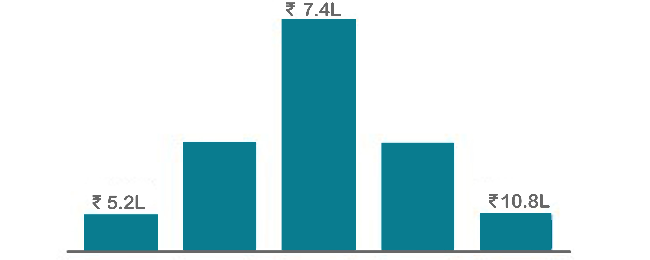

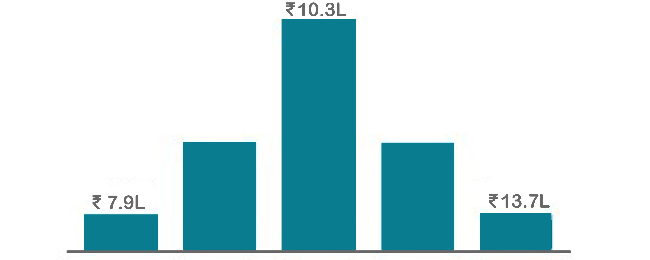
Infibee’s placement guidance navigates you to your desired role in top organisations, ensuring you stand out and excel in every opportunity.








 Posted on Google
 Vaishnavi M
Trustindex verifies that the original source of the review is Google.
I enrolled in the Workday HCM Payroll course at Infibee Technologies and I am fully satisfied with the training. The classes were easy to understand and the placement guidance together with mock interviews helped me build trust in my abilities. Job seekers should consider this program because it comes with high recommendations.Posted on Google Subhashiniwillams075I enrolled in the SAP ANALYTICS CLOUD course at Infibee Technologies and the classes were very well structured. The trainers possess industry experience and they delivered effective assistance with both resume creation and job placement services. This institution serves as the topmost educational center for SAP training courses.Posted on Google
 Deva DharshiniI recently completed the SAP CO-PA course at Infibee Technologies and had a great experience. The training quality was excellent, and the trainers were friendly, knowledgeable, and very supportive. They also provided valuable help with interview preparation and resume building, which boosted my confidence. With affordable fees and strong support, I highly recommend this institute for SAP training.Posted on Google
 Arivu VaisiThe Oracle Flexcube course at Infibee Technologies provided me with practical knowledge through its educational sessions. The trainer explained all concepts clearly and the placement support was very helpful. The program provides excellent Oracle training according to my assessment.Posted on Google
 Vishva rajaThe SAP IBP Course training is excellent. Trainers are knowledgeable and guide students with real-time scenarios. Placement support and resume preparation are very good. Highly recommended!Posted on Google
 HarishI learned SAP FSCD Course at Infibee Technologies and it was very helpful. Trainers provide real-time examples and excellent placement support. Highly recommended institute!Posted on Google
 MarudhuI completed the MS DYNAMICS 365 CRM course at Infibee Technologies and found the training to be very beneficial. The course was explained in an easy way and the placement guidance gave me more confidence. I highly recommend joining this program at the present time.Posted on Google
 Nandhini AkashI completed the Workday HR course at Infibee Technologies and the training was really helpful for my career growth. The trainers support students by providing simple explanations which include real-world examples of every topic. Highly recommended to join now.






You need not worry about having missed a class. Our dedicated course coordinator will help them with anything and everything related to administration. The coordinator will arrange a session for the student with trainers in place of the missed one.
Yes, of course. You can contact our team at Infibee Technologies, and we will schedule a free demo or a conference call with our mentor for you.
We provide classroom, online, and self-based study material and recorded sessions for students based on their individual preferences.
Yes, all our trainers are industry professionals with extensive experience in their respective domains. They bring hands-on practical and real-world knowledge to the training sessions.
Yes, participants typically receive access to course materials, including recorded sessions, assignments, and additional resources, even after the training concludes.
We provide placement assistance to students, including resume building, interview preparation, and job placement support for a wide range of software courses.
Yes, we offer customisation of the syllabus for both individual candidates and corporate also.
Yes, we offer corporate training solutions. Companies can contact us for customised programmes tailored to their team’s needs.
Participants need a stable internet connection and a device (computer, laptop, or tablet) with the necessary software installed. Detailed technical requirements are provided upon enrollment.
In most cases, such requests can be accommodated. Participants can reach out to our support team to discuss their preferences and explore available options.

We offer courses that help you improve your skills and find a job at your dream organisations.
Courses that are designed to give you top-quality skills and knowledge.
Upgrade Your Skills & Empower Yourself