SAP Workflow Training In Bangalore

5/5

Kickstart your career with the best SAP Workflow Training In Bangalore at Infibee Technologies, India’s No.1 destination for industry-ready SAP education.

Our SAP Workflow Course In Bangalore is designed by experts with 12+ years of industry experienced experts, hands-on experience, offering you real-time project exposure, resume and interview preparation, and placement support. Enjoy lifetime access to recorded sessions of live classes at affordable fees. This course covers essential topics such as Workflow Basics, Event Linkage, Business Object Repository, Tasks & Templates, Deadline Monitoring, Workflow Builder, Containers, Rule Resolution, Sub-Workflows, and Workflow Administration.

Whether you’re a fresher or a professional looking to upgrade, this is the best way to master SAP Workflow In Bangalore with certification and confidence.

Live Online :

25 hrs of E-Learning Videos
4.7
4.8
4.7

SAP Workflow Course in Bangalore Overview

Our SAP Workflow serves as an essential tool in enterprise automation aiding the smooth running of business processes through task routing and approvals. Infibee Technologies provides SAP Workflow Training In Bangalore with the primary aim of enabling students and working professionals to understand, design, and implement business processes in an automated manner using SAP. The training is intended to close the skill gap in organizations so that SAP Workflow experts can be developed to efficiently manage and optimize complex workflows.

At Infibee Technologies, we focus on imparting knowledge to the students through live projects, real-time live case studies, and mentorship from industry experts. The course syllabus covers all essential topics and concepts from basic to advanced levels of SAP Workflow such as Workflow Customization, Triggering Events, Business Object Configuration, Workflow Templates, and Integration with other SAP Modules.

Our SAP Workflow Course In Bangalore is best for those who want to make their career in SAP functional or technical fields. It is designed to help candidates prepare for the global SAP certification and placement in multinational companies.


Why Choose Infibee Technologies for SAP Workflow Course In Bangalore?

  • India’s No.1 SAP Workflow Training Institute In Bangalore
  • Certified & Experienced Trainers
  • Hands-on Training with Live Projects
  • Resume Building and Interview Preparation
  • 100% Placement Assistance
  • Affordable Fees Structure
  • Lifetime Access to Recorded Sessions
  • Mock Interviews & Real-Time Case Studies
  • Flexible Batches (Weekday/Weekend/Online)
  • Globally Recognized Certification Support

Best SAP Workflow Institute In Bangalore – Get Certified with Infibee Technologies

Being known as the Best SAP Workflow Institution In Bangalore, it has extended deeply rooted training in theories and practical experiences in workflow automation. The SAP Workflow course targets freshers, working professionals, or organizations desiring to reskill their workforce. We emphasize real-world applicability and provide individual attention to each student.

Our methodology for training involves classroom teaching, online live sessions, execution of projects in real-time, and recording the sessions to allow review and reference. The module starts with basic workflow concepts and goes up to advanced ones, including dynamic parallel processing, rule-based task assignment, workflow monitoring, and trouble shooting.Infibe also holds workshops with resume-building value, mock interviews, and high placement support services. Our certified trainers hail from top MNCs and boast hands-on project implementation experience. They ensure that every candidate will be able to sit confidently to clear SAP Workflow global certification exams.

With thousands of successful placements and high student satisfaction, Infibee Technologies is your go-to SAP Workflow Training Institute In Bangalore. Our goal is to equip you with the skills needed to succeed in a competitive job market and help you build a long-term SAP career.

Global SAP Workflow Certification Available with Cost (INR)

S.No Certification Code Cost (INR) Certification Expiry
1 C_TAW12_750 22,000 5 Years
2 E_HANAAW_18 24,500 5 Years
3 P_SECAUTH_21 27,000 5 Years
4 C_BW4HANA_24 25,000 5 Years
5 C_S4CAM_2308 28,000 5 Years
Benefits of Learning the SAP Workflow Course In Bangalore:
  • Master the automation of business processes
  • Increase productivity through task streamlining
  • Open doors to global SAP opportunities
  • Gain expertise in workflow customization and monitoring
  • Build a strong profile with SAP certification
  • Learn from industry veterans with real-time projects
  • Secure better salary packages with specialized skills
  • Flexibility in learning modes (Online/Classroom)
  • Access lifetime recorded classes and study material
  • Become job-ready with placement assistance
What You’ll Learn:
  • Introduction to SAP Workflow
  • Business Object Repository (BOR)
  • Workflow Builder and Template Creation
  • Event Linkage and Triggering Workflows
  • Tasks, Containers, and Deadlines
  • Rule Resolution Techniques
  • Monitoring and Troubleshooting
  • Integration with SAP Modules (MM, SD, FI)
  • Sub-Workflows and Error Handling
  • SAP Certification Preparation
Who Can Join?
  • Fresh Graduates (B.E/B.Tech/MBA/B.Sc/MCA)
  • SAP Functional/Technical Consultants
  • Working IT Professionals
  • Business Analysts and Project Managers
  • HR and Admin Professionals with SAP exposure
  • Anyone looking to switch into SAP roles
Career Opportunities in SAP Workflow Training In Bangalore:
Experience Level Role Salary Range (LPA)
Freshers (0-3 years) SAP Workflow Analyst Trainee 3 – 4.5 LPA
Junior SAP Workflow Consultant 4 – 5.5 LPA
Workflow Support Executive 4 – 5 LPA
Mid-Level (4-8 years) SAP Workflow Consultant 5 – 8 LPA
Senior Workflow Specialist 8 – 12 LPA
SAP Workflow Developer 8 – 12 LPA
SAP Workflow Lead 8 – 12 LPA
Senior (9+ years) Principal SAP Workflow Architect 12 – 18 LPA
SAP Workflow Project Manager 15 – 20 LPA
SAP Workflow Consultant Expert 18 – 25 LPA
Specialized Roles SAP Workflow Security Analyst 10 – 15 LPA
SAP BPM/Workflow Integration Lead 10 – 15 LPA
Who’s Hiring SAP Workflow Professionals?
  • Infosys
  • TCS
  • Wipro
  • Accenture
  • Deloitte
  • Capgemini
  • Cognizant
How to Register for SAP Workflow at Infibee Technologies?

Step 1: Register for a Free Demo

  • Visit our website and fill out the inquiry form
  • Attend our free live demo session to understand training methodology

Step 2: Select Your Training Mode

  • Choose from Classroom, Online, or Corporate Training
  • Finalize your batch schedule as per your convenience

Step 3: Start Your SAP Workflow Journey

  • Learn from top SAP Workflow instructors
  • Work on real-time projects & mock assignments
  • Prepare for certification and job interviews
Enroll Today: Unlock Your SAP Workflow Potential!

Join Infibee Technologies—the most trusted SAP Workflow Training Institute In Bangalore. Build your expertise, gain global certification, and access high-paying jobs with top organizations. Start your SAP Workflow Course In Bangalore today and unlock new career horizons in enterprise automation!

Read More...
Get In Touch With Our Career Expert

Upgrade Your Skills & Empower Yourself

Why People Choose Infibee ?

Upcoming SAP Workflow Batches in Bangalore

17-11-2025
Mon-FriWeekdays Regular
08:00 AM & 10:00 AM Batches(Class 1Hr - 2Hrs) / Per Session
19-11-2025
Mon - FriWeekdays Regular
06:00 PM & 08:00 PM Batches(Class 1Hr - 2Hrs) / Per Session
21-11-2025
Sat-SunWeekend Batch
09:00 AM & 01:00 PM Batches(Class 2Hr - 4Hrs) / Per Session
Can't find a batch? Pick your own schedule

SAP Workflow Course Syllabus in Bangalore

Join our SAP Workflow Training in Bangalore! Our syllabus encompasses essential SAP workflow management methodologies, automation tools, and advanced techniques. Led by industry experts, our practical projects empower you to analyse workflow automation effectively in this growing tech hub. Perfect for freshers and experienced professionals aiming to enhance their expertise in SAP workflow management.

  • Workflow importance
  • Workflow application
  • Task
  • Workflow template
  • Types of workflow
  • Workflow builder
  • Terminology
  • Uses of workflow
  • Customizing settings
  • Architecture
    • Components of workflow
    • Activating templates
    • Terminology
    • Structure of organizational functions, units and jobs
  • Inboxes
    • Defining substitutes
    • Processing work items
    • Possible inboxes for work items
  • Attributes
  • Methods
  • Synchronous method
  • Different macros
  • Instance dependent or independent method
  • Defining workflow using workflow builder
  • Enhancing business objects
  • Workflow wizards
  • Data definition
  • Containers
  • Ad-hoc processing options
  • Deadline monitoring
    • Requested start
    • Requested end
    • Latest start
  • Triggering workflows
  • Triggering events
  • Form
  • Fork
  • Block
  • Undefined
  • Process control
  • Web activity
  • Wait for event
  • Workflow XML structures
  • Customization
  • WebFlow service handler
    • Components
  • Technical log
  • Standard log
  • Graphic log
  • General task
  • Workflow task
  • Standard task
  • Customer task
  • Creating task group
  • Basic concept
  • Structure
  • Performance
  • Administration
  • Runtime system
  • Check function modules
  • Event generation by programming
  • Rule function modules
  • Receiver function modules
  • Definition
  • Implementation
  • Definition of attributes
  • Definition of events
  • Triggering ABAP-OO events
  • Using ABAP-OO classes in workflow processes
  • Error handling
  • Reserve
  • Inbox and outbox
  • Expressing notification
  • Dynamic columns configuration
  • Auto-forward or forward
  • Rule containers
  • Workflow binding
  • Method container
  • Task containers
  • Event containers
  • Debugging workflow
  • Requirement
  • Unit test preparation
  • Development
  • Technical specifications
Need customized curriculum?
Build Resume & Get PlacedPlacement Support With Resume Preparation & Interview Guidance

Hands On SAP Workflow Projects

Enroll in our SAP Workflow Classes in Bangalore, where our course focuses on providing high-quality training with a strong foundation in core concepts and a practical approach. Through exposure to current industry use cases and scenarios, participants will enhance their skills and gain the ability to execute real-time projects using best practices.

Employee Onboarding Workflow Enhancement

Enhance the employee onboarding process by creating an SAP Workflow that automates tasks such as document collection, form submissions, and access provisioning, improving the onboarding experience for new hires.

Purchase Order Workflow Optimization

Design and optimize an SAP Workflow for purchase order management, integrating approval hierarchies and notification mechanisms to ensure timely processing and minimize delays in procurement.

Invoice Processing Workflow Automation

Implement an SAP Workflow for invoice processing, automating invoice verification, validation, and approval processes to accelerate invoice processing cycles and reduce manual errors.

For Corporates

Educate your workforce with new skills to improve their performance and productivity.

Corporate Training
"Leading Companies We've Served"
Our Instructor
Name
Mr. Rajasekaran
Experience
7+
Specialized in
Supply Chain Management.Business Technology Platform.workflow,Financial Management.
More Details
Rajasekaran, one of Infibee's esteemed certified trainers, boasts over 7+ years of extensive experience collaborating with industry leaders in SAP Workflow. Holding certifications in SAP Workflow design, implementation, and optimization, He offers unparalleled expertise in navigating the complexities of SAP Workflow systems. With a proven track record in delivering high-quality training, He ensures that participants gain practical insights and hands-on experience in SAP Workflow management.

SAP Workflow Course Training Objectives

Our Best SAP Workflow Training in Bangalore aims to empower participants with comprehensive skills and practical knowledge in this field. The objectives focus on mastering core SAP Workflow concepts, applying skills through real-world projects, fostering critical thinking, and addressing professional challenges. This training not only enhances career development but also contributes to industry advancement by equipping participants with the expertise needed to excel in SAP Workflow management.

The integration point with the ESS (Employee Self-Service) Portal in SAP Workflow typically involves enabling employees to initiate and manage various HR-related processes directly from the ESS Portal interface. Some common integration points include:

  1. Leave Requests: Employees can submit leave requests, view their leave balances, and track the status of their requests through the ESS Portal. SAP Workflow manages the approval process, routing requests to relevant approvers based on predefined rules.
  2. Travel Expense Management: Employees can submit travel expense claims, attach supporting documents, and track reimbursement status through the ESS Portal. SAP Workflow automates the approval workflow, ensuring timely processing of expense claims.
  3. Time Entry: Employees can enter their working hours, request overtime, or report absences through the ESS Portal. SAP Workflow manages the approval process, routing time entries to supervisors for review and approval.
  4. Personal Information Updates: Employees can update their personal information such as contact details, emergency contacts, and banking information through the ESS Portal. SAP Workflow may be involved in routing these requests to HR for validation and updating in the system.
  5. Performance Appraisals: Employees can access and complete performance appraisal forms, view feedback from managers, and track performance goals through the ESS Portal. SAP Workflow facilitates the review and approval process, ensuring timely completion of appraisals.

Overall, the integration of SAP Workflow with the ESS Portal enhances employee self-service capabilities, streamlines HR processes, and improves overall efficiency within the organization.


Creating client-independent tables in SAP involves specifying the client dependency during table creation. Here’s a general overview of the steps involved:

  1. Open the Data Dictionary (transaction code: SE11).
  2. Choose the “Database table” option and enter the desired table name.
  3. Click on the “Delivery and Maintenance” tab.
  4. In the “Data Browser/Table View Maintenance Generator” section, select the “Display/Maintenance Allowed” checkbox.
  5. In the “Technical Settings” section, select the “Client-dependent” checkbox if you want the table to be client-dependent (uncheck this option for client-independent tables).
  6. Define the table fields and other properties as required.
  7. Save and activate the table.
  • Activate Debugging Mode: In the SAP Business Workflow Builder (transaction code: SWDD), open the workflow definition you want to debug. Go to “Settings” -> “Workflow Engine Settings” and activate the debugging mode by selecting “Start Debugger”.
  • Set Breakpoints: Place breakpoints at relevant points in the workflow definition where you suspect the issue may lie. This could include event triggers, task executions, or specific steps within a workflow.
  • Trigger the Workflow: Execute the workflow either manually or through the application/process that initiates the workflow.
  • Monitor Workflow Log: As the workflow runs, monitor the workflow log (transaction code: SWI1) to track its progress and identify any errors or unexpected behavior.
  • Analyze Workflow Container: Use transaction code SWELS to log changes to the workflow container during runtime. This can help you understand how data is being manipulated within the workflow.
  • Step through the Workflow: If a breakpoint is hit, you can step through the workflow using the debugging tools available in the SAP Workflow Builder. This allows you to analyze the workflow logic and data flow at each step.
  • Check Workflow Events: Use transaction code SWI2_DIAG to check workflow events and see if they are being triggered correctly.
  • Inspect Workflow Context: Use transaction code SWUS to inspect the workflow context and view details such as work item attributes, container elements, and task descriptions.
  • Correct Issues: Based on the information gathered during debugging, make necessary corrections to the workflow definition or underlying processes to resolve any issues identified.
  • Deactivate Debugging Mode: Once debugging is complete, deactivate debugging mode in the Workflow Builder settings to return the workflow to normal operation.

  • Identify the BO: Determine the standard BO that you want to extend. This could be a standard SAP BO or a custom BO that has been previously created.
  • Access the BO Builder: Open the BO Builder tool (transaction code: BOB) in the SAP GUI.
  • Find the BO: Search for the BO that you want to extend using the search functionality in the BO Builder. Alternatively, you can navigate through the BO hierarchy to locate the BO.
  • Create an Extension: Once you’ve found the BO, create an extension by right-clicking on the BO and selecting “Create Extension” from the context menu.
  • Add Custom Fields: In the extension, add custom fields (attributes) as needed to store additional data. Define the data type, length, and other properties for each custom field.
  • Add Custom Methods (Optional): If required, add custom methods to the extension to perform specific actions or calculations related to the BO.
  • Activate Extension: Once you have added custom fields and methods, activate the extension to make it available for use.
  • Implement Extension: If you’re working with SAP S/4HANA Cloud or SAP S/4HANA, you may need to implement the extension using the Custom Business Object app in the SAP Fiori launchpad. This step involves generating the necessary artifacts and deploying them to the runtime environment.
  • Test Extension: Test the extension thoroughly to ensure that custom fields and methods are working as expected and integrate seamlessly with the standard BO functionality.
  • Deploy Changes: If you’re working in a development environment, transport the changes to higher environments (such as quality assurance and production) using the SAP transport management system (transaction code: STMS).
  • Absolute Deadline: This type of deadline condition specifies a fixed date and time by which a task must be completed. For example, a purchase order approval workflow may have an absolute deadline for approving the purchase order by the end of the current business day.
  • Relative Deadline: A relative deadline condition defines a time interval relative to a specific event or trigger. For instance, a workflow may require a task to be completed within 24 hours of its creation.

  • Escalation Deadline: Escalation deadline conditions are used to escalate a task to a higher-level approver or manager if it has not been completed within a specified timeframe. For example, if a purchase requisition approval is not completed within 48 hours, it may be escalated to the next level of management for approval.
  • Reminder Deadline: Reminder deadline conditions trigger notifications or reminders to users when a task is approaching its deadline or is overdue. These reminders can be sent via email, SAP inbox, or other communication channels configured in the system.
  • Event-Based Deadline: Event-based deadline conditions are triggered by specific events or actions within the workflow. For example, a task may have a deadline condition based on the completion of a preceding task or the occurrence of a certain event in the system.
  • Custom Deadline Conditions: In addition to the standard deadline conditions provided by SAP, custom deadline conditions can be defined to meet specific business requirements. These custom conditions may involve complex logic or external factors that determine when a task must be completed.
  • Identify Parallelizable Tasks: Determine which tasks within your workflow can be executed in parallel without dependencies on each other. These tasks should be independent and able to run simultaneously.
  • Define Parallel Branches: In the workflow definition, create parallel branches to represent the parallelizable tasks. Each branch will contain one or more tasks that can be executed concurrently.
  • Implement Conditions: Use workflow conditions (e.g., workflow expressions, event triggers) to dynamically determine when parallel processing should occur. These conditions could be based on workflow data, system events, or other factors.
  • Split Workflow: Implement a workflow step (e.g., decision step) where the workflow splits into multiple parallel branches based on the conditions defined in the previous step. This step should evaluate the conditions and determine which tasks should be executed in parallel.
  • Execute Parallel Tasks: Within each parallel branch, define the tasks that should be executed concurrently. These tasks should be independent of each other and perform their respective actions or activities.
  • Synchronize Processing: Implement synchronization points in the workflow to ensure that parallel tasks are completed before proceeding to subsequent steps. This could involve using synchronization steps or event triggers to wait for all parallel tasks to finish execution.

  • Handle Exceptions: Implement error handling mechanisms to manage exceptions or errors that may occur during parallel processing. This could include handling task failures, retry logic, or rollback mechanisms to ensure data consistency.
  • Test and Optimize: Thoroughly test the workflow to ensure that parallel processing functions as expected under various scenarios and conditions. Optimize the workflow design and performance based on testing results and user feedback.

Job Assistance Program

Our Job Assistance Programme offers you special guidance through the course curriculum and helps in your interview preparation.

Specialised Curriculum
Get on-field knowledge and skills from our expert instructors.

Assessment
Upgrade your on-field skills with our assessments and track your progress in real time.
Hands-on Project
Our hands-on project help you gain experience in real-time working.
Certification Guidance
A global certificate always helps you stand out from the crowd.
Portfolio Building
Experts guide you to maximise your profile with current industry trends that employers expect.
Placment Cell
We promote your abilities and showcase your portfolio to employers.

SAP Workflow Career Opportunity

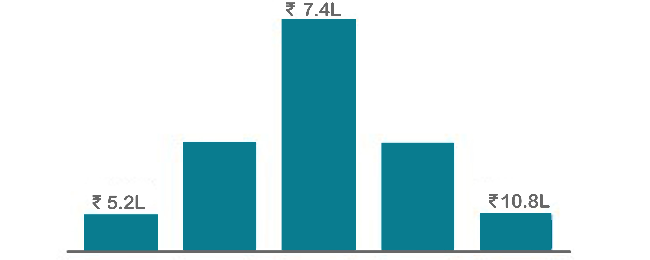
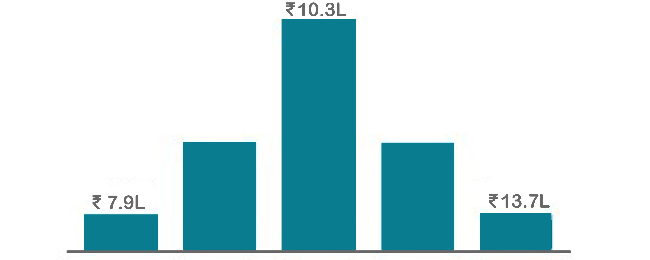
SAP Workflow is a widely-used automation tool, compatible across various computing platforms and mobile devices, requiring no frequent upgrades. It stands as one of the most lucrative career paths in the software development domain. Professionals equipped with SAP Workflow certification can command an average annual salary of 7 LPA, making it one of the highest-paying roles in the industry.

Annual Pay Scale
Employers
Annual Salary
Hiring Companies

Placement Guidance & Interview Preparation

Infibee’s placement guidance navigates you to your desired role in top organisations, ensuring you stand out and excel in every opportunity.

images
I joined Infibee in order to take a Data Science Course. Being from a non-IT background, I believe that being an IT Professional will be difficult for me. But now I believe that joining Infibee is the best decision I've ever made. My overall experience has been excellent. The teaching and non-teaching staff are both excellent. I will never forget the experience I had with Infibee. Thank you for your help and support, Infibee.
Muthu krishnan
I graduated without an IT background, but Infibee has helped me advance my career as a data scientist. Here, mentors are very helpful. With the right guidance and dedication, you can achieve your dreams. Self-study is also crucial if you want to stand out from the crowd and seize your opportunities.Companies frequently visit Infibee for placements and take some incredible talent with them.
Pranali
I enrolled in Infibee's PG Data Science course. The training experience was excellent, with 80% practical training and 20% theory, which was extremely beneficial. I learned a great deal. My placement process began after I completed my course, and I am now working as an RPA and Data Science Intern at rsutra. Nisha Mam was extremely helpful during the placement process.
Yuvaraj
The courses on Infibee are excellent. It has great value. I was non IT person and joined for Data Science course it was really helpful and interesting learning with Infibee. Teachers are also incredible they did an excellent job of ensuring that we understood each concept. Excellent job setting up the mock test and interview. I enjoyed finding more skill out of me from Infibee.I appreciate Infibee's assistance in advancing my career.
Lavanya
I completed Full Stack Development Course at infibee. Infibee is the best training institute. My trainer taught us the best concepts out there. His teaching skills are great. They are having lots of knowledge. The way of teaching is also good. I am satisfied with the course. Glad to have found this institute.
Madhaiyan Madhan

SAP Workflow Training FAQ's

Infibee SAP Workflow Training in Bangalore provides a comprehensive range of services tailored to suit both novices and seasoned professionals. Our offerings are available through both offline and online platforms, ensuring flexibility to accommodate your preferred time slots.

You need not worry about having missed a class. Our dedicated course coordinator will help them with anything and everything related to administration. The coordinator will arrange a session for the student with trainers in place of the missed one.

Yes, of course. You can contact our team at Infibee Technologies, and we will schedule a free demo or a conference call with our mentor for you.

We provide classroom, online, and self-based study material and recorded sessions for students based on their individual preferences.

Yes, all our trainers are industry professionals with extensive experience in their respective domains. They bring hands-on practical and real-world knowledge to the training sessions.

Yes, participants typically receive access to course materials, including recorded sessions, assignments, and additional resources, even after the training concludes.

We provide placement assistance to students, including resume building, interview preparation, and job placement support for a wide range of software courses.

Yes, we offer customisation of the syllabus for both individual candidates and corporate also.

Yes, we offer corporate training solutions. Companies can contact us for customised programmes tailored to their team’s needs.

Participants need a stable internet connection and a device (computer, laptop, or tablet) with the necessary software installed. Detailed technical requirements are provided upon enrollment.

In most cases, such requests can be accommodated. Participants can reach out to our support team to discuss their preferences and explore available options.

People Also Refer To Similar Courses

We offer courses that help you improve your skills and find a job at your dream organisations.

SAP S4 HANA Administration Training Course in Hyderabad
5/5
SAP Security GRC Training in Delhi
5/5
GuideWire Policy Center Training Hyderabad
5/5
ServiceNow Admin Course in Bangalore
4.6/5
Other Courses

Courses that are designed to give you top-quality skills and knowledge.

SAP S4 HANA Administration Training Course in Hyderabad
5/5
SAP Security GRC Training in Delhi
5/5
GuideWire Policy Center Training Hyderabad
5/5
ServiceNow Admin Course in Bangalore
4.6/5
Open Text Documentum D2 Course in Delhi
5/5
Open Text Documentum D2 Course in Hyderabad
5/5
SAP S4 HANA Administration Training Course in Hyderabad
5/5
SAP Security GRC Training in Delhi
5/5
GuideWire Policy Center Training Hyderabad
5/5
ServiceNow Admin Course in Bangalore
4.6/5
Open Text Documentum D2 Course in Delhi
5/5
Open Text Documentum D2 Course in Hyderabad
5/5

Get In Touch With Our
Career Expert

Upgrade Your Skills & Empower Yourself