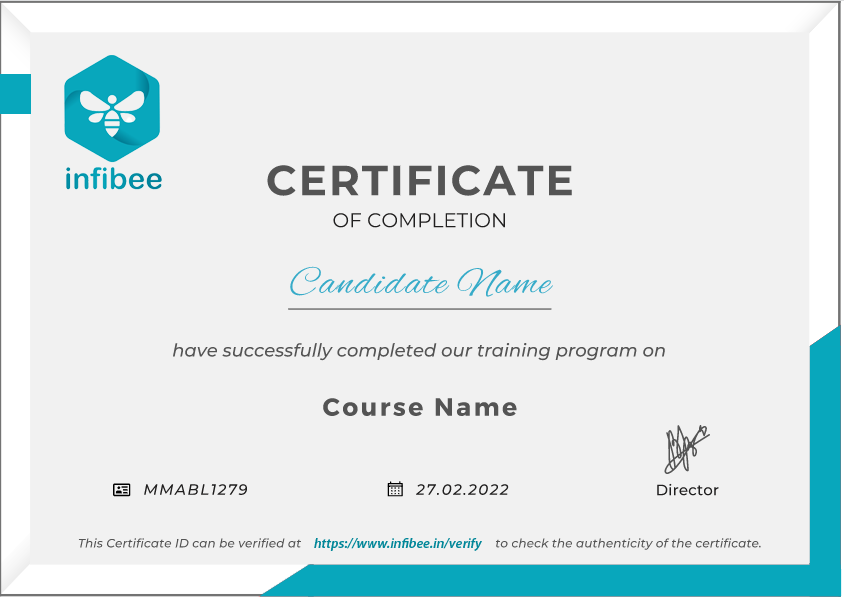
Infibee Technologies offers India’s No.1 AutoCAD Training in Noida with globally recognized certification and 100% placement guidance.
Kickstart your career in AutoCAD Course in Noida with trainers who have 12+ years of industry experience. Our program includes affordable course fees, real-time mock projects, resume preparation, interview preparation, placement training, and lifetime access to recorded sessions of live classes.
Join our AutoCAD Training Institute in Noida and ignite your AutoCAD career future with high-paying jobs in top companies.
Infibee’s AUTOCAD Training in Noida is designed to help students and professionals master 2D drafting and 3D modeling using Autodesk AutoCAD.The AUTOCAD Course designed for industry professionals teaches students how to create drawings with dimensioning and annotations and layout design and block creation and layer management and plotting techniques which will help them build their careers in civil engineering and mechanical engineering and electrical engineering and architectural design.
The Noida AUTOCAD Training provides comprehensive training which includes instruction on the AutoCAD interface and coordinate systems and drawing and modifying commands and layers and text and dimensions and blocks and external references and layouts and plotting and 3D fundamentals. Students gain practical experience through real-time projects which involve creating building plans and machine components and electrical schematics and structural drawings.
The curriculum meets both current industry standards and Autodesk certification requirements. The program provides students with resume development services and interview training and job placement assistance. The course enables students to develop professional engineering drawings while they prepare for the AUTOCAD Certification exam.
Infibee Technologies provides advantageous and reasonably priced training programs which match your search for an AUTOCAD Course near me or AUTOCAD Training in Noida near me or your evaluation of AUTOCAD course fees and AUTOCAD training fees.
AUTOCAD Topics Covered
Applications of AUTOCAD
Tools Used
AutoCAD Interface and Setup
Technical Drafting
Autodesk AutoCAD
2D Drawing Commands
Floor Plans and Layouts
Draw Tools
Modify Commands
Design Editing
Modify Tools
Layers and Properties
Organized Drafting
Layer Manager
Text and Dimensions
Documentation
Annotation Tools
Blocks and Attributes
Reusable Components
Block Editor
Layouts and Plotting
Print-Ready Drawings
Plot Manager
External References (Xref)
Collaborative Design
Xref Manager
3D Modeling Basics
Product Visualization
3D Tools
Rendering and Views
Presentation Drawings
Visual Styles
Why Choose Infibee Technologies for AUTOCAD Training in Noida?
Key Highlights
12+ Years of Experienced Design Trainers
Certification-Oriented AUTOCAD Course Curriculum
Real-Time Drafting Projects and Case Studies
Affordable AUTOCAD Training Fees
Flexible Weekday and Weekend Batches
Online and Classroom Training
Resume Preparation and Mock Interviews
100% Placement Assistance
Lifetime Access to Recorded Sessions
Free Demo Class
Autodesk Certification Guidance
Corporate Training Available.
Best AUTOCAD Institute – Get Certified with Infibee Technologies
Located in the heart of Noida, Infibee Technologies is one of the most trusted institutes for AUTOCAD Training in Noida.The dedicated training program for our industry prepares students to acquire actual engineering drafting skills and architectural drawing skills and technical documentation skills through AutoCAD software.
Our trainers possess more than 12+ years of professional experience in civil and mechanical and architectural and electrical drafting because they worked as design experts throughout their careers. The team provides thorough explanations of concepts together with practical training that uses current projects which include residential floor plans and machine part drawings and electrical panel layouts and structural detailing.
Infibee Technologies provides complete placement assistance which includes resume development and LinkedIn profile enhancement and mock interview sessions and aptitude test preparation and interview recommendations to their hiring partners. Our alumni work as CAD Designers and Draftsmen and Design Engineers and BIM Technicians in top MNCs and engineering firms.
The AUTOCAD Course which we offer provides training for students and diploma holders and engineers and architects and working professionals from all backgrounds. Infibee Technologies provides effective learning and exceptional job prospects for those who search for AUTOCAD Training in Noida.
AUTOCAD Certification Support
Infibee Technologies provides complete support for AUTOCAD Certification, including exam guidance, practice sessions, official syllabus coverage, and expert mentoring to help you validate your drafting and design skills.
Our Alumni Are Hired By Top Companies
TCS
Infosys
Wipro
L&T
Tata Projects
Shapoorji Pallonji
HCL Technologies
Capgemini
Siemens
Bosch
Modes of AUTOCAD Training in Noida at Infibee Technologies
Classroom Training in Noida
Live Online Instructor-Led Training
Weekend Batches
Fast-Track Training
Corporate Training
One-to-One Personalized Training
Global Certifications Available for AUTOCAD Training in Noida
S.No
Certification Code
Approximate Cost (INR)
Certification Expiry
1
Autodesk Certified User (ACU) – AutoCAD
₹7,000 – ₹10,000
3 Years
2
Autodesk Certified Professional (ACP) – AutoCAD for Design and Drafting
₹15,000 – ₹25,000
3 Years
3
Autodesk Certified Associate (Legacy)
₹8,000 – ₹12,000
3 Years
4
Autodesk Professional Certification Bundle
₹20,000 – ₹30,000
3 Years
Benefits of Learning AUTOCAD Training in Noida
Master 2D drafting and 3D modeling
Create industry-standard technical drawings
Improve productivity with blocks and templates
Prepare print-ready layouts and documentation
Prepare for globally recognized AUTOCAD Certification
Gain practical experience through real-time projects
Receive placement assistance and interview preparation
Access high-paying design and drafting roles
Strengthen engineering and architectural skills
Build an industry-ready portfolio
What You’ll Learn
AutoCAD Interface and Workspace Setup
Drawing and Modify Commands
Layers and Properties
Text, Dimensions, and Leaders
Blocks and Attributes
External References
Layouts and Plotting
3D Modeling Basics
Rendering and Visualization
Real-Time Project Drawings
Who Can Join?
Engineering Students
Diploma Holders
Civil Engineers
Mechanical Engineers
Architects and Interior Designers
Electrical Engineers
Draftsmen
Working Professionals
Career Opportunities in AUTOCAD Training in Noida
Experience Level
Job Role
Salary Range (India)
Freshers (0–3 Years)
CAD Designer Trainee
₹3.5 – ₹5.5 LPA
Freshers (0–3 Years)
Junior Draftsman
₹3 – ₹5 LPA
Freshers (0–3 Years)
Design Technician
₹3.5 – ₹6 LPA
Mid-Level (4–8 Years)
AutoCAD Designer
₹6 – ₹10 LPA
Mid-Level (4–8 Years)
Design Engineer
₹7 – ₹12 LPA
Mid-Level (4–8 Years)
BIM Technician
₹7 – ₹12 LPA
Senior (9+ Years)
Senior Design Engineer
₹12 – ₹20 LPA
Senior (9+ Years)
CAD Manager
₹15 – ₹25 LPA
Senior (9+ Years)
Project Design Lead
₹18 – ₹30 LPA
Specialized Roles
Architectural Drafting Specialist
₹6 – ₹12 LPA
Specialized Roles
Mechanical CAD Expert
₹8 – ₹15 LPA
Specialized Roles
Structural Detailing Specialist
₹8 – ₹16 LPA
Who’s Hiring AUTOCAD Professionals?
L&T
Tata Projects
Shapoorji Pallonji
Siemens
Bosch
TCS
Infosys
Wipro
AECOM
Jacobs
CBRE
Arcadis
Can I Study AUTOCAD Course in Other Locations?
Yes! Infibee Technologies offers AUTOCAD Training across major cities through online mode, including:
AUTOCAD Training in Chennai
AUTOCAD Training in Bangalore
AUTOCAD Training in Hyderabad
AUTOCAD Training in Delhi
AUTOCAD Training in Pune
AUTOCAD Training in Noida
With expert mentors, real-time project exposure, industry-recognized certification, and placement support, Infibee Technologies provides AUTOCAD Online Training across India.
How to Register for AUTOCAD at Infibee Technologies?
Step 1: Register for a Free Demo
Go to our website and submit the inquiry form.
Participate in a free demo session to learn about our training methodology.
Step 2: Select Your Training Mode
Choose between classroom, online, or corporate training.
Confirm your batch timing and convenience.
Step 3: Start Your AUTOCAD Journey
Begin learning with expert instructors.
Work on real projects and practical assignments.
Get ready for AUTOCAD Certification and placement interviews.
Enroll Today: Unlock Your AUTOCAD Training in Noida Potential!
Join the best AUTOCAD Training in Noida Institute today and become a certified design professional ready to create industry-standard technical drawings.
Join our AutoCAD Training in Pune! Our syllabus encompasses essential AutoCAD methodologies, automation tools, and advanced techniques. Our practical projects are led by industry experts, empowering you to analyze business processes effectively in this growing tech hub. Perfect for freshers and experienced professionals aiming to enhance their expertise in AutoCAD.
Join our AutoCAD training in Pune! Our syllabus encompasses essential ANSYS methodologies, simulation tools, and advanced techniques. Our practical projects are led by industry experts, empowering you to analyze simulation processes effectively in this growing tech hub. Perfect for freshers and experienced professionals aiming to enhance their expertise in ANSYS.
Residential Floor Plan Design
Create a detailed floor plan for a house. Include rooms, doors, and windows. Focus on space utilization.
Office Layout Planning
Design an office space layout. Arrange desks, meeting rooms, and common areas. Ensure efficient workflow.
Kitchen Remodeling Blueprint
Draft a blueprint for a kitchen remodel. Include cabinets, appliances, and countertops. Optimize the kitchen work triangle.
For Corporates
Educate your workforce with new skills to improve their performance and productivity.
Corporate Training
Customised training with customised curriculum to meet the requirements of your workforce
Diversified learning models Live online training, Self-paced videos, On-premises training, and Classroom training
Dedicated lab setup with software installation, evaluation reports of employees, and study material with video recoding
We have a diverse pool of skilled instructors from numerous industries, ensuring the best fit for your customised requirements
Track and measure the impact of training on individuals and teams with our evaluation performance report
Hari is one of Infibee's top-certified trainers in AutoCAD , boasting over 9 years of hands-on experience collaborating with industry professionals. He holds certifications in AutoCAD ensuring expertise in cutting-edge data management technologies.
Our AutoCAD Training in Pune aims to empower participants with complete skills and practical knowledge in this field. Objectives provide you with mastering core concepts, applying skills through real-world projects, critical thinking, and ensuring professional challenges. This enhances career development and contributes to industry advancement.
What certifications are available for AutoCAD ?
Earning an AutoCAD certification demonstrates proficiency and can enhance your resume. Autodesk offers official certification exams at different levels.
What job opportunities are available for professionals skilled in AutoCAD ?
Proficiency in AutoCAD opens doors to roles such as CAD technician, designer, and drafter in industries like architecture, engineering, and manufacturing.
What is the average salary for AutoCAD professionals in India?
AutoCAD professionals typically earn competitive salaries, with entry-level positions starting around $50,000 annually, and experienced designers earning significantly more.
How does expertise in AutoCAD impact career growth?
Career advancement can include moving into senior design roles, project management, or specialized areas such as BIM (Building Information Modeling).
What are some relevant topics to focus on when learning AutoCAD ?
Key topics include 2D and 3D drafting, CAD standards, industry-specific applications, and integration with other design software.
Job Assistance Program
Our Job Assistance Programme offers you special guidance through the course curriculum and helps in your interview preparation.
Specialised Curriculum
Get on-field knowledge and skills from our expert instructors.
Assessment
Upgrade your on-field skills with our assessments and track your progress in real time.
Hands-on Project
Our hands-on project help you gain experience in real-time working.
Certification Guidance
A global certificate always helps you stand out from the crowd.
Portfolio Building
Experts guide you to maximise your profile with current industry trends that employers expect.
Placment Cell
We promote your abilities and showcase your portfolio to employers.
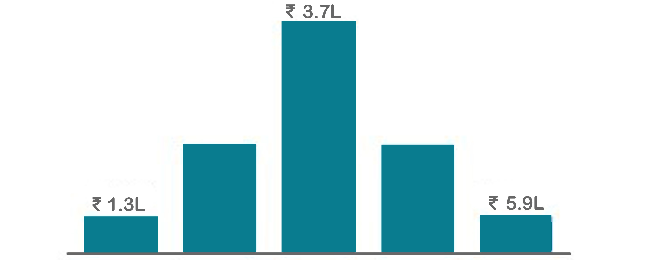
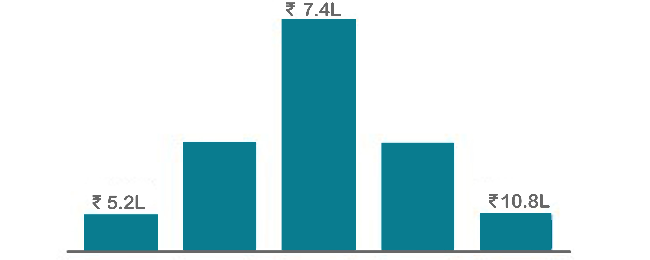
AutoCAD Training in Pune is the most common programming language, and it works on all computers and mobile devices without needing to be upgraded. It is one of the highest-paying careers in the software development industry, and those with the AutoCAD Training certification can earn an average of 7 LPA per year.
Annual Pay Scale
Employers
Annual Salary
Hiring Companies
Placement Guidance & Interview Preparation
Infibee’s placement guidance navigates you to your desired role in top organisations, ensuring you stand out and excel in every opportunity.
Resume Enhancement: Updating and enhancing your resume to effectively highlight your abilities, experience, and accomplishments.
Mock Interviews: Practice real-life interviews with feedback to fine-tune your responses, boost confidence, and reduce anxiety.
Industry Insights: Stay informed about industry trends, company culture, and expectations to excel in interviews.
Job Portal Updation: Update or create your profile in job portals with our guidance and listing of key words for your preferred designation.
Customized Preparation: Targeted preparation for specific job roles, ensuring you are well-prepared for role-specific questions.
Interview Strategies: Comprehensive coaching on interview techniques and communication skills to ace any interview.
Confidence Building: Boosting self-assurance and equipping you with the mindset needed to excel during interviews.
Online Presence: Optimizing your online presence, including LinkedIn profiles and social media, to align with your career goals.
Posted on Google
Vaishnavi M
Trustindex verifies that the original source of the review is Google.
I enrolled in the Workday HCM Payroll course at Infibee Technologies and I am fully satisfied with the training. The classes were easy to understand and the placement guidance together with mock interviews helped me build trust in my abilities. Job seekers should consider this program because it comes with high recommendations.
Posted on Google
Subhashiniwillams075
Trustindex verifies that the original source of the review is Google.
I enrolled in the SAP ANALYTICS CLOUD course at Infibee Technologies and the classes were very well structured. The trainers possess industry experience and they delivered effective assistance with both resume creation and job placement services. This institution serves as the topmost educational center for SAP training courses.
Posted on Google
Deva Dharshini
Trustindex verifies that the original source of the review is Google.
I recently completed the SAP CO-PA course at Infibee Technologies and had a great experience. The training quality was excellent, and the trainers were friendly, knowledgeable, and very supportive. They also provided valuable help with interview preparation and resume building, which boosted my confidence. With affordable fees and strong support, I highly recommend this institute for SAP training.
Posted on Google
Arivu Vaisi
Trustindex verifies that the original source of the review is Google.
The Oracle Flexcube course at Infibee Technologies provided me with practical knowledge through its educational sessions. The trainer explained all concepts clearly and the placement support was very helpful. The program provides excellent Oracle training according to my assessment.
Posted on Google
Vishva raja
Trustindex verifies that the original source of the review is Google.
The SAP IBP Course training is excellent. Trainers are knowledgeable and guide students with real-time scenarios. Placement support and resume preparation are very good. Highly recommended!
Posted on Google
Harish
Trustindex verifies that the original source of the review is Google.
I learned SAP FSCD Course at Infibee Technologies and it was very helpful. Trainers provide real-time examples and excellent placement support. Highly recommended institute!
Posted on Google
Marudhu
Trustindex verifies that the original source of the review is Google.
I completed the MS DYNAMICS 365 CRM course at Infibee Technologies and found the training to be very beneficial. The course was explained in an easy way and the placement guidance gave me more confidence. I highly recommend joining this program at the present time.
Posted on Google
Nandhini Akash
Trustindex verifies that the original source of the review is Google.
I completed the Workday HR course at Infibee Technologies and the training was really helpful for my career growth. The trainers support students by providing simple explanations which include real-world examples of every topic. Highly recommended to join now.
I joined Infibee in order to take a Data Science Course.
Being from a non-IT background, I believe that being an IT Professional will be difficult for me. But now I believe that joining Infibee is the best decision I've ever made. My overall experience has been excellent. The teaching and non-teaching staff are both excellent. I will never forget the experience I had with Infibee. Thank you for your help and support, Infibee.
Muthu krishnan
I graduated without an IT background, but Infibee has helped me advance my career as a data scientist. Here, mentors are very helpful. With the right guidance and dedication, you can achieve your dreams. Self-study is also crucial if you want to stand out from the crowd and seize your opportunities.Companies frequently visit Infibee for placements and take some incredible talent with them.
Pranali
I enrolled in Infibee's PG Data Science course. The training experience was excellent, with 80% practical training and 20% theory, which was extremely beneficial. I learned a great deal. My placement process began after I completed my course, and I am now working as an RPA and Data Science Intern at rsutra. Nisha Mam was extremely helpful during the placement process.
Yuvaraj
The courses on Infibee are excellent. It has great value. I was non IT person and joined for Data Science course it was really helpful and interesting learning with Infibee. Teachers are also incredible they did an excellent job of ensuring that we understood each concept. Excellent job setting up the mock test and interview. I enjoyed finding more skill out of me from Infibee.I appreciate Infibee's assistance in advancing my career.
Lavanya
I completed Full Stack Development Course at infibee. Infibee is the best training institute. My trainer taught us the best concepts out there. His teaching skills are great. They are having lots of knowledge. The way of teaching is also good. I am satisfied with the course. Glad to have found this institute.
Madhaiyan Madhan
AutoCAD Training FAQ's
Infibee AutoCAD Training In Pune offers wide range of services that suits for both fresher and experienced persons via both offline and online at your suitable time slots.
What if I Miss a Class ?
You need not worry about having missed a class. Our dedicated course coordinator will help them with anything and everything related to administration. The coordinator will arrange a session for the student with trainers in place of the missed one.
Will I get a Free Demo?
Yes, of course. You can contact our team at Infibee Technologies, and we will schedule a free demo or a conference call with our mentor for you.
What are the Modes of Training in Infibee ?
We provide classroom, online, and self-based study material and recorded sessions for students based on their individual preferences.
Are the trainers at Infibee Technologies experienced in the industry?
Yes, all our trainers are industry professionals with extensive experience in their respective domains. They bring hands-on practical and real-world knowledge to the training sessions.
Can I access course materials after the training is complete?
Yes, participants typically receive access to course materials, including recorded sessions, assignments, and additional resources, even after the training concludes.
Do you offer placement assistance?
We provide placement assistance to students, including resume building, interview preparation, and job placement support for a wide range of software courses.
Do you offer customized training for corporate clients?
Yes, we offer customisation of the syllabus for both individual candidates and corporate also.
Can companies or organizations inquire about group training for their employees?
Yes, we offer corporate training solutions. Companies can contact us for customised programmes tailored to their team’s needs.
What technical requirements are needed to participate in live online training sessions?
Participants need a stable internet connection and a device (computer, laptop, or tablet) with the necessary software installed. Detailed technical requirements are provided upon enrollment.
Can I switch from self-paced to live online training or vice versa during the course?
In most cases, such requests can be accommodated. Participants can reach out to our support team to discuss their preferences and explore available options.
People Also Refer To Similar Courses
We offer courses that help you improve your skills and find a job at your dream organisations.
PyTorch Course in Gurgaon
26685
45 HRS
Intermediate
Rated 5 out of 5
PyTorch Course in Noida
26685
45 HRS
Intermediate
Rated 5 out of 5
AI Recommendation Systems Training in Hyderabad
23564
48 HRS
Intermediate
Rated 5 out of 5
PyTorch Course in Delhi
26685
45 HRS
Intermediate
Rated 5 out of 5
Other Courses
Courses that are designed to give you top-quality skills and knowledge.